
Best Practices for Using Sandboxie to Restrict Rogue Software's Disk Access
A summary of practical methods to limit certain rogue software from scanning the hard disk in the background using Sandboxie.
Background
I saw comments on a video website suggesting that Win10 can use a tool called Sandboxie-Plus to restrict software behavior, so I downloaded Sandboxie-Plus for trial.
My usual approach to rogue software is to avoid it or run it on a virtual machine or a dedicated PC. However, for certain software that is necessary to use, this approach sacrifices some convenience. This time, I want to explore whether this solution can be stable, convenient, and universal.
The main requirement is to limit disk reading and scanning (Resource Access - File).
Overview and Summary of Sandboxie
- Although it's open source, there are not many resources available within the relevant community.
- The official documentation is quite simple, and most settings are unclear to those not in the operating system industry.
- There are some seemingly very useful simplified configuration items that require a paid membership.
- The
Resource Accessrule settings only provide a single blacklist with no support for priority, regex, glob, etc., making it difficult to implement advanced configurations. - Brief overview of the sandbox file functionality: All files on the computer can still be read, but when a write action occurs, it can only write to the "virtual" folder under the sandbox root (for example, when writing to D:/app, the sandbox will create a
<rootDir>/drive/D/app). - After
Resource Accessrestrictions, the program can stilllsthe folder, but cannot access the contents within the folder.
Summary of Practical Configuration
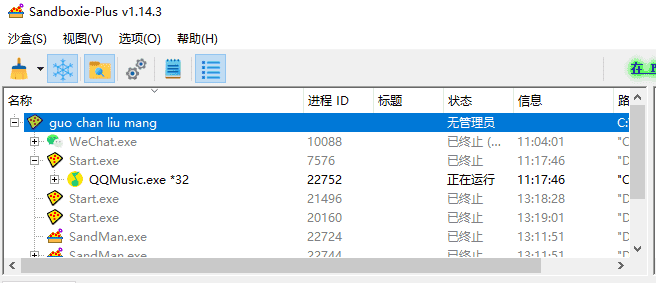
Create a sandbox to restrict the daily used software WeChat and QQ Music.
Location of the Sandbox Root Folder and Software Installation
- Sandbox root folder position: create a folder under drive C
- Software installation position: under drive C
Why place it in drive C?
Firstly, these rogue programs need to access some system calls upon startup, so permissions for drive C are essential. Since Sandboxie does not support priority and whitelists, it cannot allow partial access to folders on drive C, ultimately leading to restrictions on key positions of drive C. Placing both the sandbox root and the software location on drive C allows you to completely disable access permissions for other drives.
For other positions on drive C, if access needs to be restricted, they must be added manually one by one; templates can be created for reuse.
Configuration Content
Sandbox Options -> Resource Access -> File
ClosedFilePathcorresponds to the interface configurationAccess: Closed
ClosedFilePath=D:\*

ClosedFilePath=E:\*

ClosedFilePath=F:\*

ClosedFilePath=%UserProfile%\AppData\Local\Google

ClosedFilePath=%UserProfile%\AppData\Local\Microsoft

ClosedFilePath=%UserProfile%\.ssh

ClosedFilePath=%UserProfile%\.gnupg

ClosedFilePath=%UserProfile%\.bash_history
Referring to QQ Accessing User Privacy Files? A Guide for You – Running QQ Desktop Version with Sandboxie Plus (No QQProtect.exe Needed) - Eric (ericclose.github.io), the key locations on drive C that are restricted include:
- User's browser directory
- User's .ssh
- User's private key directory
- User's proxy configuration directory
Other Notes
- It’s best to clear the original user directory of the software before running it in the sandbox.
- WeChat, upon startup, will set
<document>/WeChat Filesas the chat history save directory. If a version of WeChat that has already been run on the host machine starts in the sandbox (with the old chat history directory restricted), it will prompt you to set a new directory (this step is fine) but then it will attempt to copy from the original directory and crash. Therefore, it is necessary to migrate by renaming the original directory and manually copying files over after logging in. - Long-term use of QQ Music has caused cache directories to swell to 40GB; it is speculated that its cache during operation did not effectively recognize and performed repeated downloads.